> For the complete documentation index, see [llms.txt](https://gspro.gitbook.io/gspro-knowledge-base/llms.txt). Markdown versions of documentation pages are available by appending `.md` to page URLs; this page is available as [Markdown](https://gspro.gitbook.io/gspro-knowledge-base/troubleshooting-and-support/downloading-latest-stable-launcher.md).
# Downloading Latest Stable (Launcher)
## Downloading The Latest Stable (Launcher):
If you’re reading this guide, you may need to force GSPro to (re)download the latest version. This can be done from a few methods, but the easiest method will be directly on the GSPro Launcher.
### Launching GSPro:
Close out of GSPro completely for this process. Once done, locate and launch GSPro from the desktop icon (Little Golf Ball) If GSPro is launched from another path/location, the GSPro Launcher may not work as intended. Once GSPro is launched from the desktop icon, keep an eye out for the GSPro Launcher.
### Where Do I Locate this tool:
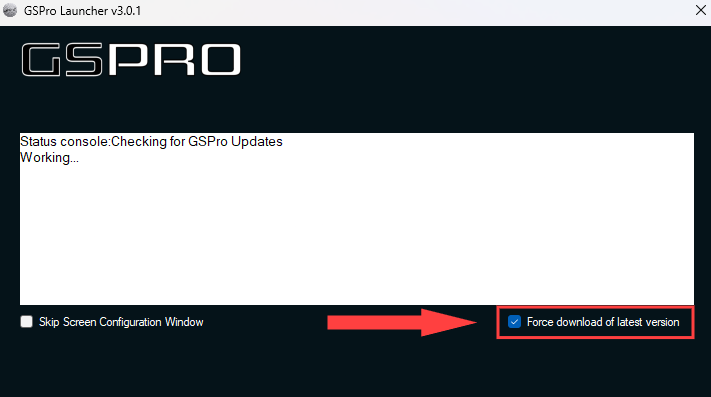
Once the GSPro Launcher appears on screen, locate the “Force Download of Latest Version” tool in the bottom right corner of the Window. To activate the tool, check the box and GSPro will locate/reinstall the latest version offered.
With the above done, you will start to see the latest version of GSPro being grabbed/installed. If you continue to experience any issues, don’t hesitate to reach out to us at
.png)