# How To Move Course Folder

## GSPro // How to move course folder

The following describes how to move your GSPro course folder to another location and/or storage drive.&#x20;

{% hint style="danger" %}
***Note:** It is important to follow the steps outlined. If you do not, and you simply move the entire course folder without following the instructions, the GSPro Launcher will think the installation is corrupt.*
{% endhint %}

### Steps:

1. If installing a new storage drive, make sure the drive is installed, configured, and formatted correctly.
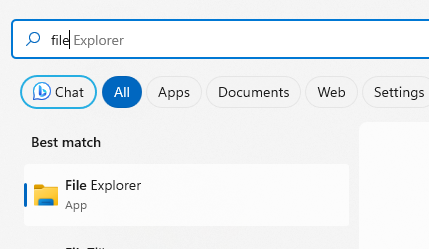
2. Open a Windows File Explorer and navigate to the location where you want to store courses.
   1. ![](https://lh7-us.googleusercontent.com/yCmBlHfOXmKyc1VS8fSY3cRWu8saNR9Dq7zb4vlb_o7OW85xO57adFsl-gT4PtOS-qAvOX0R33l2kOIAX548xZY8B7rj0cxqRFahR47twjBBCm4uogSML7yrehFQZIZtIn7_i9xPRSnt8TZna1nWPxs)
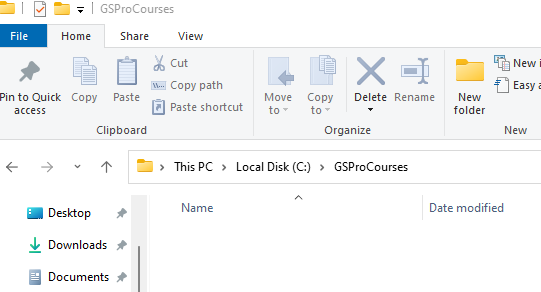
3. Create a new folder with a name of your choice. In this example, we are naming it “GSProCourses”
   1. ![](https://lh7-us.googleusercontent.com/mc_gKh_grsrF8tJKDI19rhrAlha79J4x7KssgoVA5UQVp50XTKPa3QiAzu56zjVJI3JLB0-M1g1ZpwWBMVAM5uLPsf2yMXZgaIik9Uihrr-wFQmHBa6MJKBGpiOBeMJQ9F4Gog_xdAyNFcy3ZTPL6g0)
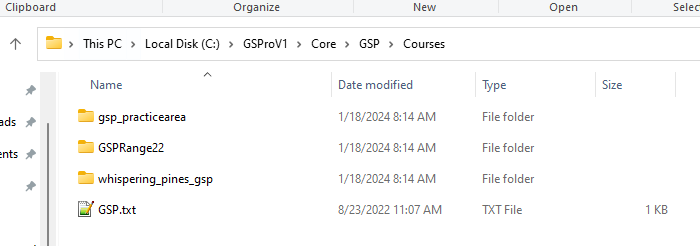
4. Navigate to the **original** course folder
   1. The default installation path is: C:\GSProV1\Core\GSP\Courses
   2. ![](https://lh7-us.googleusercontent.com/a7BXHnqfEZnyIhPNaQ3uVQy3c2hhECKu_aEe7aWMieamNUrrf_lKsL0KeN3H2ouOOyL0WLQQLMPnwZU-FnKDsXtRp4Wa9K8OxLQAuIvcGxzWtZCt_tKh5qZsKXgn5XkgC70FfCEnJ7JE6K7jhGZW2Oc)
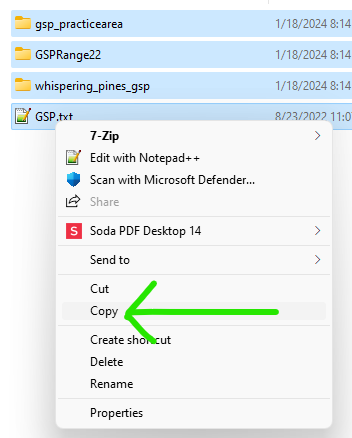
5. **IMPORTANT: Highlight all of the files and folder inside of this directory, right click, and select COPY**
6. ![](https://lh7-us.googleusercontent.com/j10duldhgfOq5DExsEzYwJPmY_YEM3xbmU-aHFlnb4-D1mPPu0Udc8uQlRdlYkWy2EYEcfYeVu0gLJiCewd3VxhWAclFToKs3TjUtxAn_oVmrMzSKVb44IYy1UQwTlUMgAa8BRlX8wt7vzFpY5F4rDw)
7. Navigate back to your **new** course folder location.&#x20;
   1. In this example, C:\GSProCourses
   2. ![](https://lh7-us.googleusercontent.com/5WV7UXiEo1SW1tvbSjvqGHI9Wi5jK1NNOwe6d-VjaAfxKoOi01RZVUJQx0zrwqWXn6lTGXoZIu4QCMw4imQEC25WjXYjYx74qT5ysVbeR8PSZmfFBrG3QNRHoWZU2XqEizQ-Fea6VmDRu6sxg12KqF4)
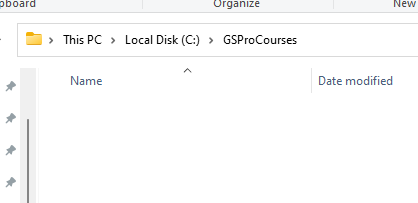
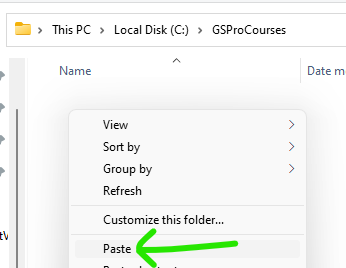
8. Right click, and select PASTE
   1. ![](https://lh7-us.googleusercontent.com/V6kZW_uq7mXhouRDsDQcbZZJlfAS_oO3vj8UhaK04RLqwx7tGXSOrLb86SdAVoZv1RgYIgDJpOqDwlgixzat0Qcd_QJtQ2q9R-O8m28IJIFkksJv8_nJDLlaoeNPNeYonAvjT5-yKUfoQ-e1c18hhMg)
9. Start GSPro via the desktop launcher
10. Navigate to Settings -> Game -> System
    1\.

    ```
    <div align="left"><img src="https://cdn.document360.io/535cda27-121e-40f3-b793-98802baf85cf/Images/Documentation/image(384).png" alt="" width="521"></div>
    ```
11. Update the Course Folder location with the new course folder path

    1. In this example: C:\GSProCourses
    2.

    ```
    <div align="left"><img src="https://cdn.document360.io/535cda27-121e-40f3-b793-98802baf85cf/Images/Documentation/image(385).png" alt=""></div>
    ```
12. Hit the Save And Exit button in the lower right corner
    1\.

    ```
    <div align="left"><img src="https://cdn.document360.io/535cda27-121e-40f3-b793-98802baf85cf/Images/Documentation/image(386).png" alt=""></div>
    ```
13. Exit GSPro
14. **The following are cleanup steps**
15. Using the File Explorer, navigate to the **original** course folder
    1. ![](https://lh7-us.googleusercontent.com/sormkRdf6EqK7ntGojnN9OoeysIp8Dbbi2aflzr372wWaarFpmbCQqc38hM43Jv2IiHvjQ-fI0bH4hdI0XOG8sby-2yk9nYL6FnUBma8CvTjhSmeqIRMxlt2boFNsUZlOPWdOzNL9JwDkQp35xaHDsk)
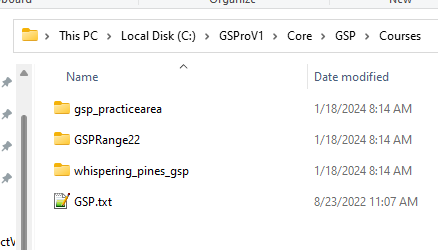
16. There are three very important files and folders. These CANNOT be deleted
    1. GSP.txt
    2. GSPRange22
    3. Gsp\_practicearea
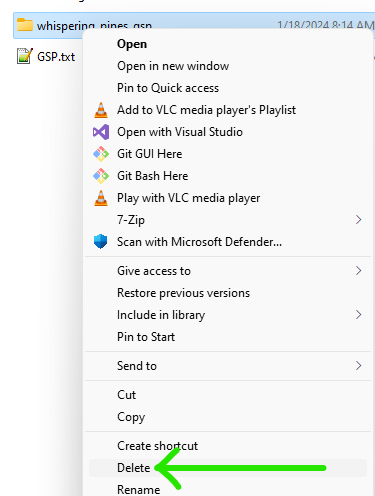
17. Delete all the remaining folders
    1. ![](https://lh7-us.googleusercontent.com/nnFPb2aOHbm0kJ4uN4HYFPkwOHHtOPCl8lE8enNEjPhcIPHM_IIR7pqyMbh-0yZ0v4MwqDMoSexr70A6AMF3cpVkOH9n3CWirZnoulpBtyQjK3mxWr7vQtSVji6TcFp-WqKH1IPqdJ5hr-9uUZVE8g8)
18. Cleanup is complete
19. Restart GSPro


---

# Agent Instructions: Querying This Documentation

If you need additional information that is not directly available in this page, you can query the documentation dynamically by asking a question.

Perform an HTTP GET request on the current page URL with the `ask` query parameter:

```
GET https://gspro.gitbook.io/gspro-knowledge-base/setup-and-installation/how-to-move-course-folder.md?ask=<question>
```

The question should be specific, self-contained, and written in natural language.
The response will contain a direct answer to the question and relevant excerpts and sources from the documentation.

Use this mechanism when the answer is not explicitly present in the current page, you need clarification or additional context, or you want to retrieve related documentation sections.