# How to Download and Install

## GSPro // How to Download and Install<br>

### Getting Started:

1. Click this link to download the GSPro Installer
   1. The time it takes to download will depend on your internet connection speed
   2. Download link: <https://dvzg6a325ik1w.cloudfront.net/GSProInstaller.zip>
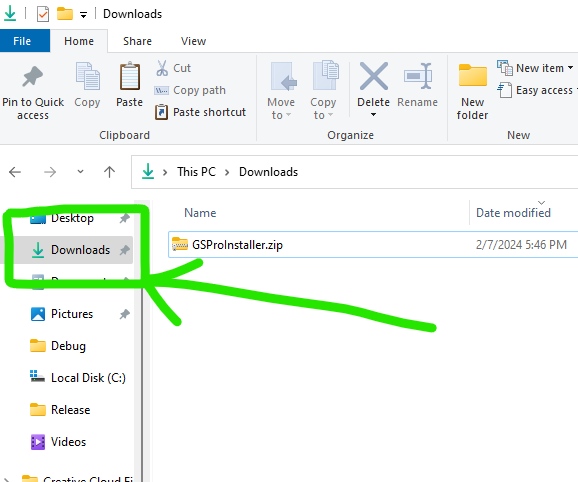
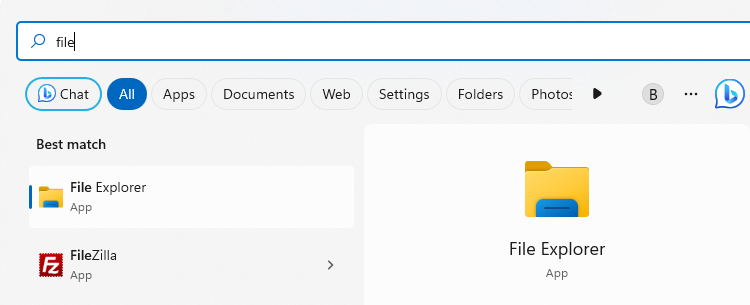
2. Once complete, open a Windows File Explorer window and navigate to the Download folder
   1. ![](https://lh7-us.googleusercontent.com/lrjX7gEVDKU8739wtml3n0RNAB7gsUJQBHEX59_xmvftHPMsVfFjQkQ0oJ45YqokFw7cpAZpvmCbxNlEC7bv1W3qrzuc4yANo5uiiYHI5nIwX46eEipTGrFO7ZpXB0v0cRuGipzux7_kNWwn1l8wSFQ)
   2. ![](https://lh7-us.googleusercontent.com/-CObZsDJCS7Jq1o6miWJUSbBIKqkqYW3H-DkWJJVmu6Irk4TKzpRPzaSr7DDsRdowYyBthSpHEPihydaWNF6e4uGYHXT8PW28CH4OVsRdPZN-eIHbRe-PmM1v0WEYFjg_sXsqliCdiCxGBQ1s2QpG8E)
3. Locate the file named “GSProInstaller.zip” and double click it
   1. ![](https://lh7-us.googleusercontent.com/4ucOg2rCPEQjAuhsXKsPdvHPTY5QDEHtCeheSVCFWY_1IiyRfonVKK9lGgI6NaAmKn9cmvAATAiu9XobtAF_T_dWsmzKx1cS9yuj_5gxnjrJkXKFluHVy3DPaBcX8ZSpEmKj2Qxa1LC1ckyRD3ak0Gw)
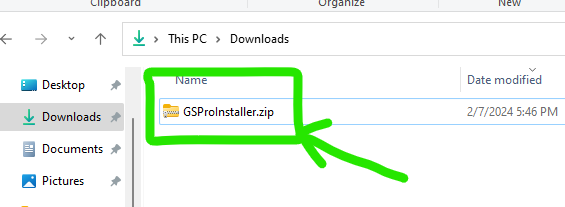
4. A new window will open with two files in it. Double click the file named GSProV1.msi
   1. ![](https://lh7-us.googleusercontent.com/hS5K_tH4I45hNMMDUkH6EorX4DUn1kEZWt7e4f8ti7vuKFc96dq1puygt-cGLc0Pd5BawgGNj1yhSX4LvupMAuVzU7Ox6HbeYeSO2CX6MjyfdmAmm0onEtbTF6JJAMz3te6jn3CJ8jNcpR-YjYsQQmQ)
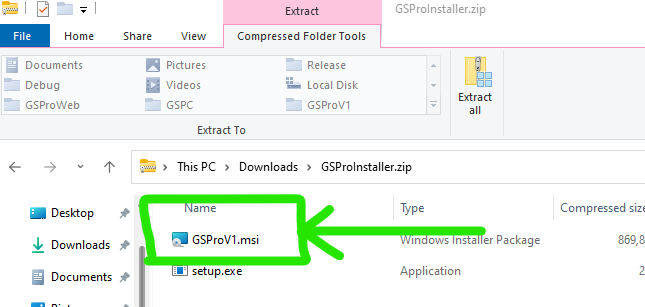
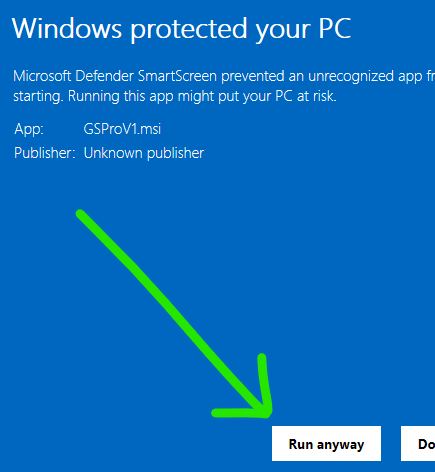
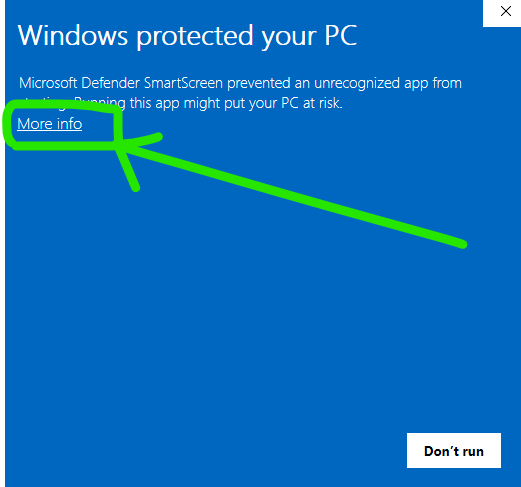
5. That will likely open a blue window. Click the “More Info” button and then the “Run Anyway” button
   1. ![](https://lh7-us.googleusercontent.com/4o7bxhLD9L5pazXcwy6b8pI4g1_ZD-6zXolWtZ5Szli96pQf89Z2IaIE0-H96w8o2l8AxnnP2ubgYNvlnIK6KiLaZcbYdZsFMLrPA017wd9ZkTSgM02DIiFu1Bbz8q58aXdJFNSQ-0OCBidfRP6Aee4)
   2. ![](https://lh7-us.googleusercontent.com/xiujzwizT6Qn-JH5c6OK5GJA9eJt9_J4Gj810EsaqaxpMm217XSmyV-sxRoB2WybpJk9Et4ggog9mmtup7xeRKwwYoiyHYNeRoooOj6c8_fU-JJXHwOrOJ62LB4HVBrLGtpbHbunEBNX2fwt454R2WA)
6. The GSPro Setup Wizard will open
   1. Hit Next
   2. ![](https://lh7-us.googleusercontent.com/YYwVe1T_nUox7_Mx9BGABGGyE6vdXmnGtljgXRMjNOYldBTMKefdg3Efn5MqVNgNOR6ChA3Oa1BUOpoGGM1x5fyH8qYnKwq9d3xAFN_tOV_FykSLaU6Sd-ntRj19CPQ_SYu-suypoHftgBcpp08VN7M)
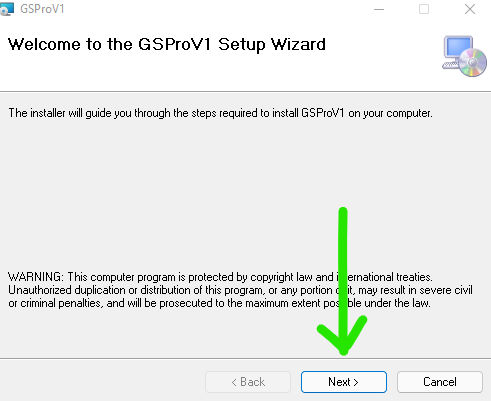
   3. On the Select Installation Folder screen, hit Next
      1. Unless you need to change location, we recommend leaving the default C:\GSProV1 in place
      2. ![](https://lh7-us.googleusercontent.com/0JnVosZ9uggs1A4ZAOrq7OKSFD88WFwmkPiF8WAHLL_e7Fr0G4brUi4i5UsgnKlA6g75uUjkUkktH3WWmGOz_XoiGH3I1GxRC8dZFZlSerEFXq4aTNgVu149vS6wTm1tmBIo2RSjT-kXrIw0C8pqMXs)
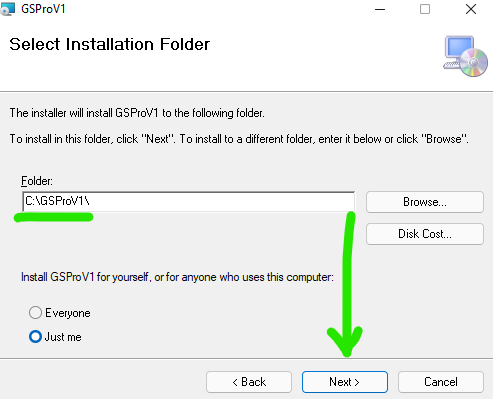
   4. On the Confirmation installation screen, hit Next
      1. ![](https://lh7-us.googleusercontent.com/o6quQg8HYCsu0B26D3eo_v6pxm309I3qYccYv5TqXKDsWMyObxQwx3bHcf88sIoHgY1YrGOAKNknXtsXlFBevn52tfWP8RCJUm8C3RnWHd3x8icazSZN3AXKXjc8ysNl-1uheoW2R-38YbePc-AlaY0)
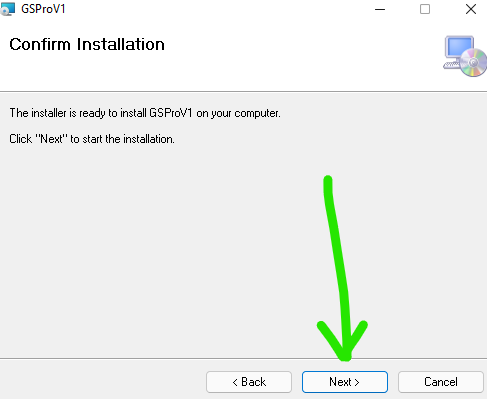
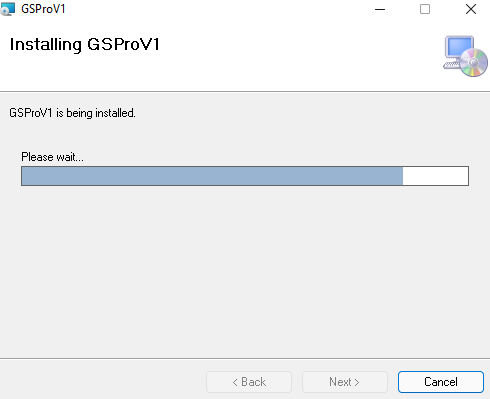
   5. The installation will begin
      1. ![](https://lh7-us.googleusercontent.com/DyL1bgCAG43eCKLwtv_6ghD56lKCxGyskOLCPHHw1CupgOMcZ8EhrKAtmOfs2ZOTEXU1qAAqwFv-MoToZZqkI7-wMzpHygzgnYhjcaT6kQQQRXQVh0vHgbbOrivdNMwdbUTfoMEIARlXzhh6hM95djU)
   6. Once complete, hit the Close button
      1. ![](https://lh7-us.googleusercontent.com/pHXPEEgoI4LrqKxNxfZNeXdp8Vc_vveJymjOKvZTNl_mUfaYIGpfzWtXKnGk7V4lC4GH9n5xtUERoT5Z_HIdSqGGpI0ItSh4vdMW2TlTnAB0wSp-ti2Dkq8W4-RcU2SS2kZd5Q2nRLSrLNqZUGti2t8)
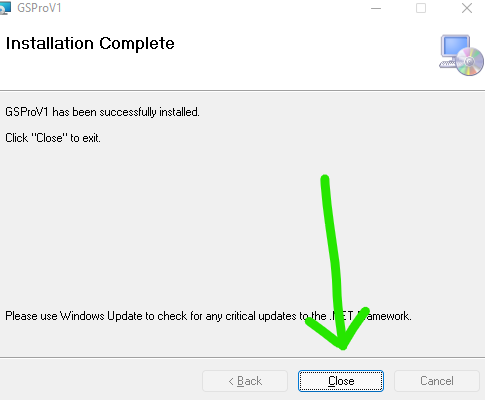
7. GSPro is now installed!
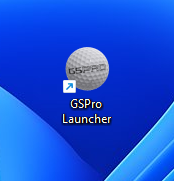
8. Double click on the GSPro “Launcher” icon on the desktop. It is the golf ball icon
   1. ![](https://lh7-us.googleusercontent.com/Zsb_-6Nb4WOAt8p4ao2lEOaWh1x3yK0ePSsjxnGCok8KPeBFAv_WV4aIFlUEVmVKZk5dSHus5sOaSHwbBe79oFi6rSmdc6-9tdSVi_hihuiCSNveuCbhMOkleEM09hSP8gh204qG409koqTLhHRJ0Ek)
9. The GSPro Launcher will open and check for updates and automatically download any that are available
   1. ![](https://lh7-us.googleusercontent.com/kEaPgi1z2t-Ud4T2fjikP3nYNMSYLxX76linhSqhuhNf7xLaIH74OK0W826YOpgLGbkZHS783QXT5g8qru0uZ9AVfOFQ16P6Oe9rTG1sJa82M9wIrZ7bJ4hQQi6B2JBjmaMEPEY9WDXOPkJYJI13YBI)
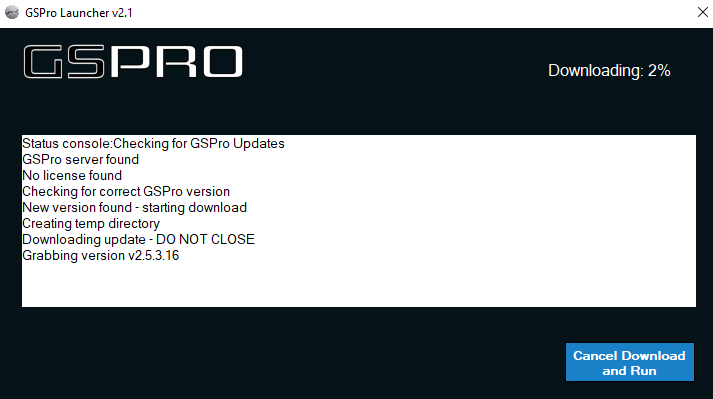
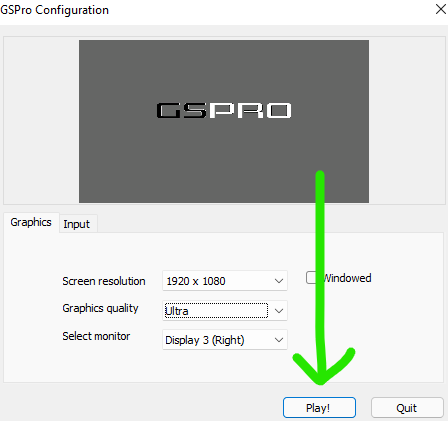
10. The Launcher will automatically close and open the GSPro Configuration window
    1. You need to carefully set your desired display resolution and quality settings
    2. GSPro quality settings are dependent on the PC’s performance capabilities
       1. A powerful gaming PC is required to run GSPro on Very High or Ultra settings
       2. If in doubt, start with the GSPro Lite setting and increase after testing
    3. ![](https://lh7-us.googleusercontent.com/gyKBOC_kONVAUT6yPMZvcILDQ5sotuwH3w42GupMA6NDCcGgfYgTUiZHystApJarL3OPFVaohwqKIV3L9thKJ1ulKiBCuoACtGepUJI2XgkozJuB3Ro8Duf99IUwkHY69K02L-4pn15l6-6_qMMw5xk)
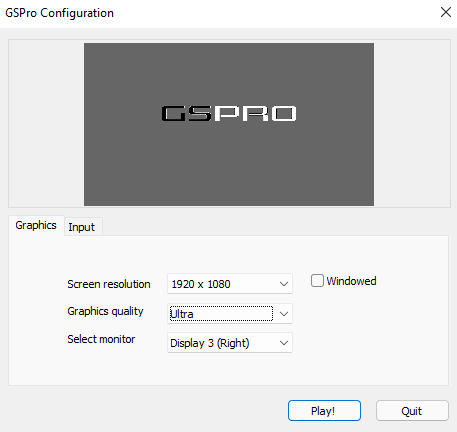
    4. When ready, hit “Play”
    5. ![](https://lh7-us.googleusercontent.com/wW4xfIwQoUAgPFXkbeQez4r8g7J4QkwoQMSZr7AG2amANh4MFtRM1_o1wOfWgdLBGJ3Z7k-ahE13EJSvozvcvAvx3ZByPwZrCnc6O0M9vdI2e9S4f8nQSvqM0XpxBp5RR-_XJOy3-TW6OcK1BIfmKrg)
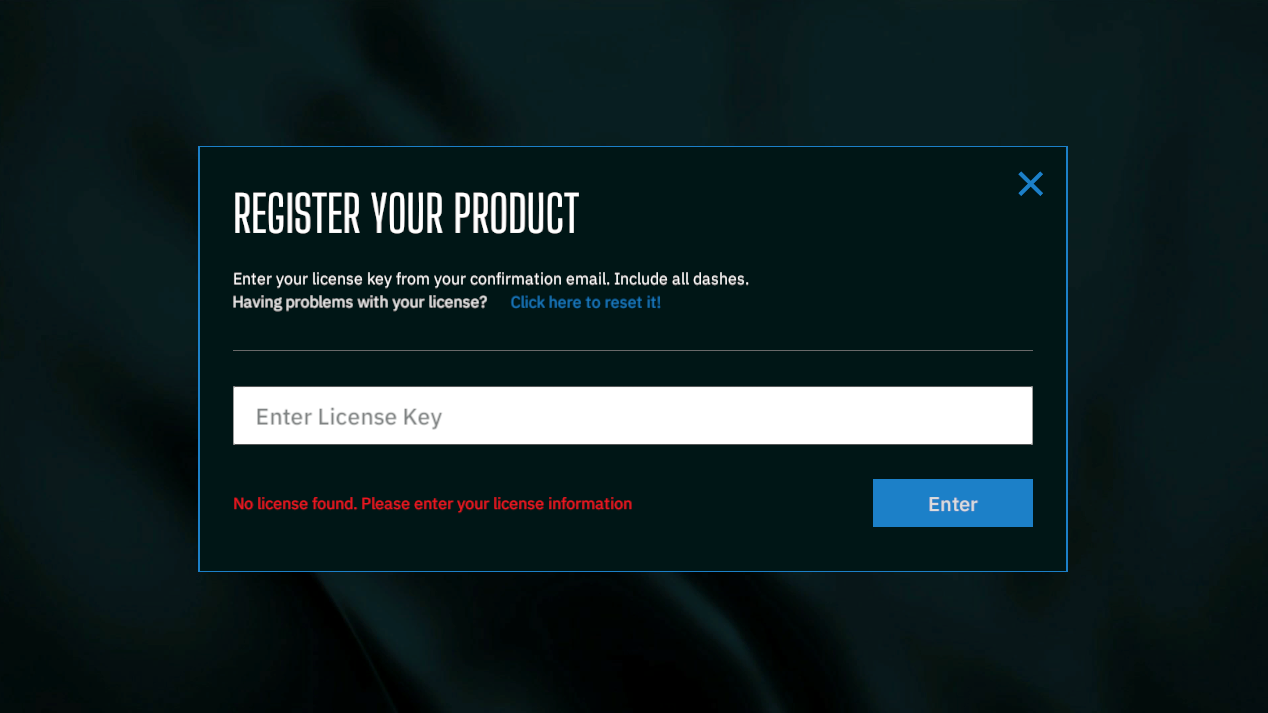
11. GSPro will open and you will be prompted to enter your GSPro License Key
    1. Enter the license key **EXACTLY** as it was sent in your GSPro Email
       1. The letters must be capitalized and dashes included
    2. ![](https://lh7-us.googleusercontent.com/FyRZD5o6y5lfuQ4DpkwVjlsgwVNjRPj9PNOxpY667kj8QErvd9jGpIe-Dt2AlbQ1sp885YYv5jyJTe5vzrDssa4CHqOiul-DXR71PUlc4aXtCFr77A8FYCl5ZgY_gvY-u1RFhFvRQJ0K9kgYs6J5O0E)
12. For additional game play information, refer to the User Guide
    1. <https://www.dropbox.com/s/qpqfqy3carrgz4c/GSPro%20Users%20Guide-V2.0.2.pdf?dl=1>


---

# Agent Instructions: Querying This Documentation

If you need additional information that is not directly available in this page, you can query the documentation dynamically by asking a question.

Perform an HTTP GET request on the current page URL with the `ask` query parameter:

```
GET https://gspro.gitbook.io/gspro-knowledge-base/setup-and-installation/how-to-download-and-install.md?ask=<question>
```

The question should be specific, self-contained, and written in natural language.
The response will contain a direct answer to the question and relevant excerpts and sources from the documentation.

Use this mechanism when the answer is not explicitly present in the current page, you need clarification or additional context, or you want to retrieve related documentation sections.