> For the complete documentation index, see [llms.txt](https://gspro.gitbook.io/gspro-knowledge-base/llms.txt). Markdown versions of documentation pages are available by appending `.md` to page URLs; this page is available as [Markdown](https://gspro.gitbook.io/gspro-knowledge-base/local-match-main-menu/ghost-play.md).
# Ghost Play
## Ghost Play:
You are now able to play against “ghost” players in your Local Match rounds. Below is a quick guide going over what exactly Ghost Play is and the settings/features surrounding it.
### What Is Ghost Play:
Ghost Play allows players to save completed 18-hole Stroke Play rounds as "Ghost Players" that can then be selected as players in future matches. When included in your Local Match rounds, these Ghost Players automatically take their turns, firing the exact same shots from their recorded rounds. This feature lets you and others in the GSPro community compete against previous performances, whether your own or the top performing community rounds.
By default Ghost Play is disabled. To enable Ghost Play, head into the GSPro Game Settings and select “Enable Ghost Play”:
.png) ### How To Check For Ghost Rounds:
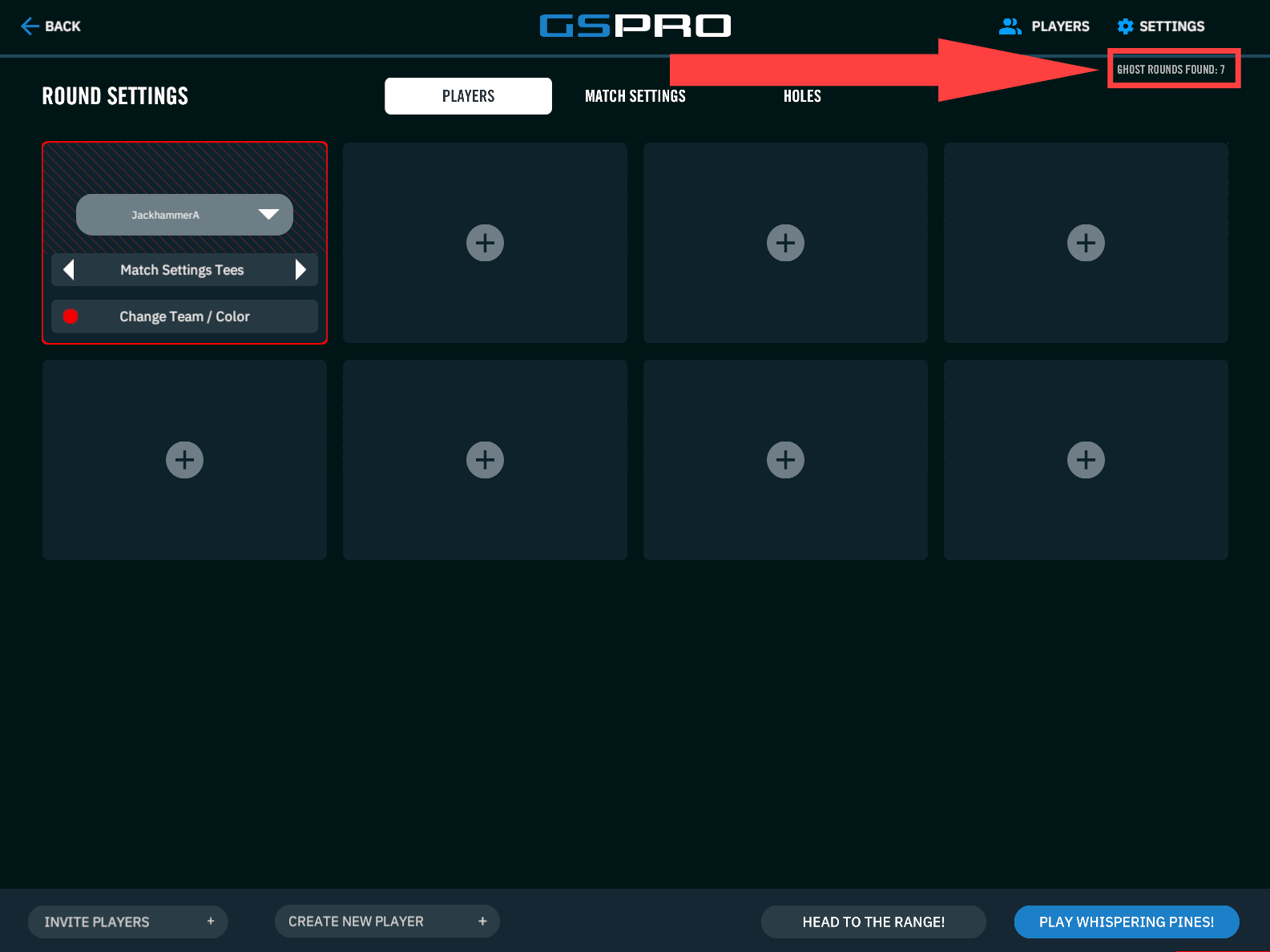
Since Ghost Play is a relatively new feature, not all courses will have Ghost Rounds saved in the cloud to play against. To see if a course has any Ghost Rounds available, select the desired course as normal. If the course has any Ghost Rounds available, a small indication will be displayed in the top right corner of the screen as seen below. If a course doesn’t yet have any Ghost Rounds made available to select, you can save your own with the steps shown later in this guide:
{% hint style="info" %}
Note: Ghost Play is not available for online matches
{% endhint %}
### How To Check For Ghost Rounds:
Since Ghost Play is a relatively new feature, not all courses will have Ghost Rounds saved in the cloud to play against. To see if a course has any Ghost Rounds available, select the desired course as normal. If the course has any Ghost Rounds available, a small indication will be displayed in the top right corner of the screen as seen below. If a course doesn’t yet have any Ghost Rounds made available to select, you can save your own with the steps shown later in this guide:
{% hint style="info" %}
Note: Ghost Play is not available for online matches
{% endhint %}
 ### Ghost Play Settings:
Before starting a round with a Ghost Player included, consider adjusting the below Ghost Player Setting:
* **Ghost Shot Speed:** Moving this slider will adjust the speed Ghost Players will take their shots. It can be adjusted from a 1x (Or normal speed) all the way up to 2.5x (A 2.5 fast forward speed)
### Ghost Play Settings:
Before starting a round with a Ghost Player included, consider adjusting the below Ghost Player Setting:
* **Ghost Shot Speed:** Moving this slider will adjust the speed Ghost Players will take their shots. It can be adjusted from a 1x (Or normal speed) all the way up to 2.5x (A 2.5 fast forward speed)
.png) ### Adding A Ghost Player:
If a course shows valid Ghost Rounds, select a new player tile as if you were adding another local player. You’ll then be able to select the small Ghost icon adjacent to the default “Empty Slot” text. One or more of the five Ghost Rounds will be shown to select from:
1. **Local:** These rounds are the manually saved rounds by any player locally at your PC.
2. **GSPro Cloud:** These are the best rounds per a given course and tee box stored in the GSPro cloud.
3. **GSPro Cloud ?:** This is a ghost round from the GSPro cloud with a hidden score.
4. **SGT:** If you’re not participating in an SGT tournament but the course has been utilized in one, you can play against the best round from that tournament.
5. **SGT Tournament:** If you’re playing in an SGT tournament, you’ll be able to see and play against the current best score.
### Adding A Ghost Player:
If a course shows valid Ghost Rounds, select a new player tile as if you were adding another local player. You’ll then be able to select the small Ghost icon adjacent to the default “Empty Slot” text. One or more of the five Ghost Rounds will be shown to select from:
1. **Local:** These rounds are the manually saved rounds by any player locally at your PC.
2. **GSPro Cloud:** These are the best rounds per a given course and tee box stored in the GSPro cloud.
3. **GSPro Cloud ?:** This is a ghost round from the GSPro cloud with a hidden score.
4. **SGT:** If you’re not participating in an SGT tournament but the course has been utilized in one, you can play against the best round from that tournament.
5. **SGT Tournament:** If you’re playing in an SGT tournament, you’ll be able to see and play against the current best score.
.png) ### Saving Your Round Locally:
By default, GSPro will automatically save all completed 18-hole Stroke Play rounds to the cloud. (Not all Ghost Rounds saved to the cloud are made available to select later) To ensure you can play against your round later as a Ghost Round, select the ghost icon found adjacent to your player’s name at the end of the round on your scorecard. This will save that round as a “Local Ghost Round” mentioned previously you can then later select:
### Saving Your Round Locally:
By default, GSPro will automatically save all completed 18-hole Stroke Play rounds to the cloud. (Not all Ghost Rounds saved to the cloud are made available to select later) To ensure you can play against your round later as a Ghost Round, select the ghost icon found adjacent to your player’s name at the end of the round on your scorecard. This will save that round as a “Local Ghost Round” mentioned previously you can then later select:
.png)